AWS Blue/Green Deployment – Zero-Downtime CI/CD & Automated Security Testing
A blue/green deployment pipeline built on AWS CodePipeline and AWS CodeDeploy lets teams release new application versions without downtime, validate them against production infrastructure before users see them, and roll back in seconds if anything goes wrong, so every release becomes a routine event instead of a high-risk one. Static application security testing (SAST) with SonarQube and container vulnerability scanning with Trivy are built into the pipeline, so code and images with critical security findings are stopped before they can be deployed.
Benefits
uptime, backed by multi-AZ task placement and ECS automated recovery
faster deployment speed with automated blue/green pipelines
improvement in engineering team efficiency on AWS Fargate
No maintenance windows; traffic shifts from the old version to the new one with no interruption
Traffic returns to the previous version automatically on failed health checks or CloudWatch alarms
New versions are tested on production infrastructure through a separate test listener before going live
All-at-once, canary, or linear traffic shifting to limit the impact of a bad release
Every commit is built, tested, and deployed automatically, with optional approval gates
Every pipeline run, approval, and deployment is recorded with a full execution history
SonarQube SAST and Trivy image scans run on every build, with a quality gate that blocks critical findings
Every scan report is stored in Amazon S3, giving a record of what was checked before each release
Overview
Many teams still release software by updating servers or containers in place. During the update, the application is partly old and partly new, users can hit errors, and a failed release must be fixed forward or rolled back by redeploying the previous build, which takes time while customers are affected. To limit the risk, releases are pushed into late-night maintenance windows and happen less often.
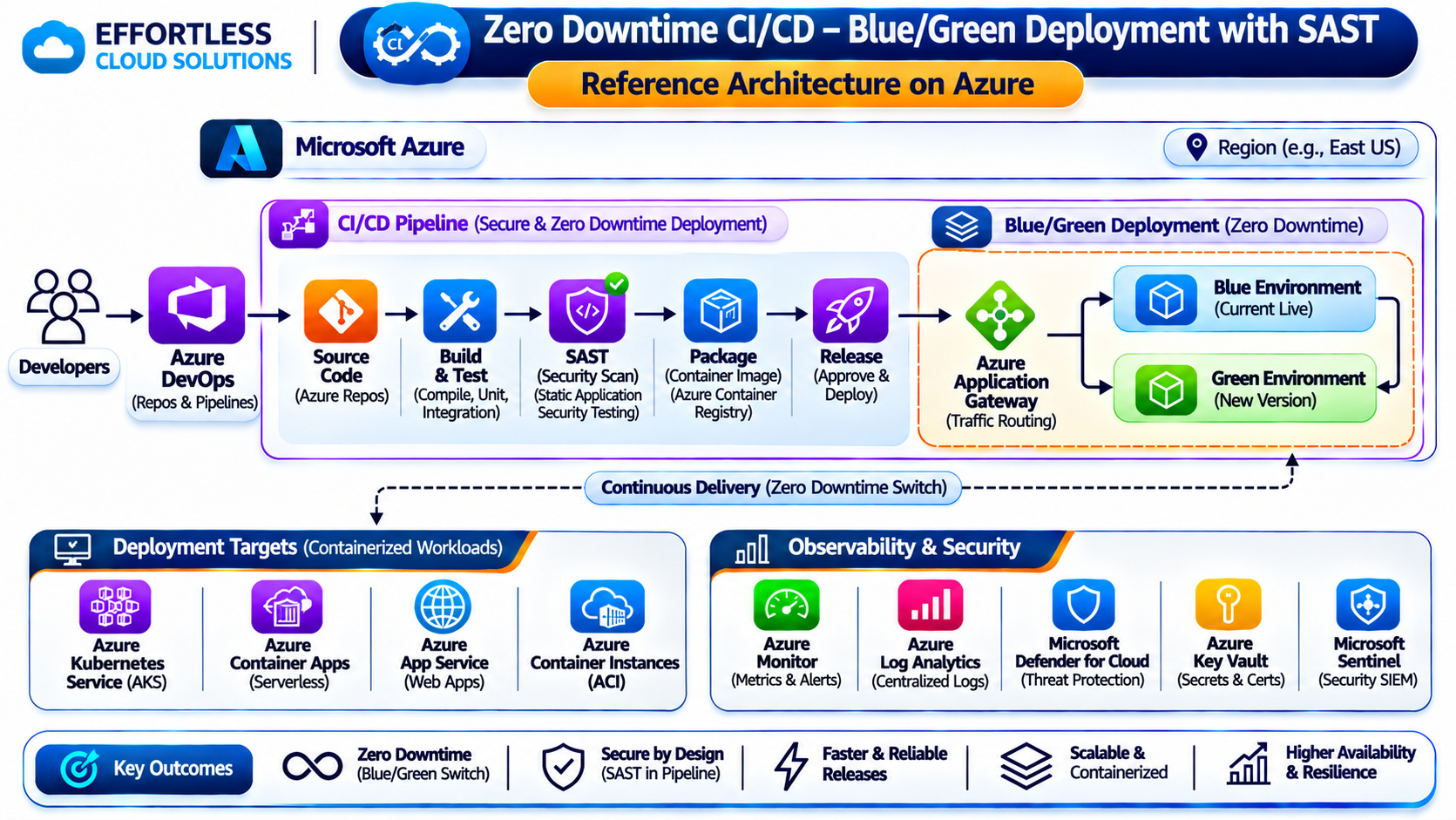
Blue/green deployments remove this risk. The current production environment ("blue") keeps serving users while a complete new environment ("green") is created with the new version. AWS CodePipeline automates the path from source code to deployment, and AWS CodeDeploy creates the green environment, runs validation tests against it, shifts production traffic to it through the load balancer, and keeps blue ready for an instant rollback. The result is a release process that is fast, repeatable, and safe to run during business hours.
Security checks are part of the same automated path. Before a new version is pushed to Amazon ECR, the build stage runs SonarQube static analysis on the source code and Trivy vulnerability scanning on the container image. If either scan finds critical issues, the quality gate fails the build, the pipeline stops, and the team is notified, so insecure code never reaches the blue/green deployment step.
About Blue/Green Deployments with AWS CodePipeline
AWS CodePipeline is a fully managed continuous delivery service that models the release process as stages, such as source, build, test, approval, and deploy, and runs them automatically on every change. AWS CodeDeploy is a fully managed deployment service that supports blue/green deployments for Amazon ECS and Amazon EC2 with Auto Scaling groups. For Amazon ECS, CodeDeploy launches a replacement task set alongside the existing one, uses Application Load Balancer or Network Load Balancer listeners to move traffic between them, and can run validation hooks at each step of the traffic shift. SonarQube is a static application security testing (SAST) and code quality platform that analyzes source code for vulnerabilities, security hotspots, bugs, and maintainability issues, and evaluates the results against a configurable quality gate. Trivy is an open-source security scanner that checks container images for known vulnerabilities in operating system packages and application dependencies, as well as for misconfigurations and exposed secrets. Both run inside AWS CodeBuild as part of the pipeline.
Opportunity: Moving Beyond Risky In-Place Releases
In-place deployments replace the running version of an application with a new one on the same infrastructure. If the new version has a defect, a configuration error, or a missing dependency, users are exposed to it immediately. There is no clean, running copy of the previous version to fall back to, so recovery means rebuilding and redeploying the old release under pressure.
Manual release processes add further risk. Engineers run scripts by hand, steps differ between environments, and there is little record of who released what and when. Testing usually happens in staging, which never perfectly matches production, so some problems only appear after users are already affected.
Security testing is often separate from the release process. Code reviews may miss injection flaws or hard-coded secrets, container images are built on base images with known vulnerabilities, and security scans, when they happen at all, run after deployment or on a schedule. By the time a vulnerability is found, it is already running in production.
Organizations in this position need a release process that tests new versions on real production infrastructure, shifts traffic gradually and under control, and makes rollback a single automatic step instead of an emergency. It also needs automated security checks that run on every change and stop vulnerable code before it is released.
The Solution
Source Stage
The pipeline starts automatically on every commit to the release branch. Source code is pulled from GitHub, GitLab, or Bitbucket through AWS CodeConnections, or from Amazon S3, and a new container image pushed to Amazon ECR can also trigger a release.
Build and Test Stage
AWS CodeBuild compiles the application, runs unit and integration tests, builds the Docker image, scans it, and pushes it to Amazon Elastic Container Registry (Amazon ECR). The build produces the task definition and AppSpec file that CodeDeploy uses to create the green environment.
Static Application Security Testing with SonarQube
After the build and unit tests pass, CodeBuild runs the SonarQube scanner against the source code. SonarQube analyzes the code for security vulnerabilities such as injection flaws, insecure cryptography, and hard-coded credentials, flags security hotspots for review, and reports bugs and code smells. The results are evaluated against the SonarQube quality gate.
Container Vulnerability Scanning with Trivy
The newly built container image is then scanned with Trivy before it is pushed to Amazon ECR. Trivy checks operating system packages and application libraries against vulnerability databases, and can also detect secrets and misconfigurations in the image. Only images that pass the scan are pushed to ECR and continue through the pipeline.
Security Quality Gate
The pipeline enforces a fail-closed quality gate. If the SonarQube quality gate fails, or Trivy finds vulnerabilities at or above the configured severity (for example, CRITICAL), the CodeBuild stage fails, the pipeline stops, and nothing is pushed to ECR or deployed. A notification is sent through Amazon SNS to the team Slack channel with the reason for the failure.
Scan Reports in Amazon S3
SonarQube and Trivy reports from every build are saved to an encrypted Amazon S3 bucket, organized by pipeline run. Teams use them to investigate failed builds, track how findings change over time, and provide evidence of security testing for audits and compliance reviews.
Approval Gates
Manual approval actions can be placed before production deployments, so a release manager reviews the change and approves it from the console or a notification. Lower environments deploy automatically without approval.
Blue/Green Deployment with AWS CodeDeploy
The deploy stage uses the Amazon ECS blue/green deployment action. CodeDeploy launches the new version as a replacement (green) task set next to the existing (blue) task set and registers it with a second target group on the Application Load Balancer. Blue continues to serve all production traffic until green has passed validation.
Pre-Production Validation
A separate test listener on the load balancer routes test traffic to the green task set before any users reach it. Lifecycle hooks such as AfterAllowTestTraffic and BeforeAllowTraffic run automated smoke tests and health checks against green, and the deployment stops automatically if any test fails.
Controlled Traffic Shifting
Production traffic moves from blue to green using the deployment configuration that fits the risk of the change: all at once, canary (for example, 10% of traffic first, then the rest after a set time), or linear (for example, 10% more every minute). Gradual shifting limits how many users a defective release can reach.
Automatic Rollback
CodeDeploy monitors Amazon CloudWatch alarms for error rates, latency, and task health during and after the traffic shift. If an alarm fires or the deployment fails, traffic is routed back to the blue task set automatically. Blue is kept running for a configurable wait time after the release, so rollback is immediate rather than a redeploy.
Infrastructure as Code
The pipeline, CodeBuild projects, CodeDeploy application, deployment groups, target groups, listeners, and IAM roles are defined as code in Terraform. New services get the same proven release process by reusing the same templates.
Notifications and Visibility
Pipeline and deployment events are published through Amazon EventBridge and Amazon SNS to email, Slack, or Microsoft Teams. Teams see each stage, approval, and deployment result in real time, and AWS CloudTrail records every action for audit. When a security scan stops the pipeline, the notification identifies the failed check so developers can fix the issue and push a new commit.
Results
Zero-Downtime Releases
Users are served by a healthy version of the application at every point in the release. Maintenance windows are no longer needed, and releases can happen during business hours.
Instant, Automatic Rollback
Because the previous version keeps running, rollback is a traffic switch on the load balancer that takes seconds, triggered automatically by failed health checks or CloudWatch alarms.
Fewer Failed Releases Reaching Users
New versions are tested on production infrastructure before receiving live traffic, and canary or linear shifting means problems are caught while only a small share of users is exposed.
Faster Delivery
Automated build, test, and deploy stages remove manual steps, so teams can release smaller changes more often with less coordination.
Consistent, Repeatable Process
Every application and environment follows the same pipeline, defined as code, removing configuration drift and one-off release scripts.
Full Audit Trail
Every commit, build, approval, and deployment is recorded in CodePipeline execution history and AWS CloudTrail, which supports change management and compliance requirements.
More Confident Teams
With safe deployments and automatic rollback in place, engineers spend less time on release coordination and incident recovery, and more time building features.
Vulnerabilities Stopped Before Release
SonarQube and Trivy check every build, and the fail-closed quality gate prevents code or images with critical findings from ever reaching the blue/green deployment.
Security Built Into Every Release
Security testing runs automatically on every commit instead of as a separate, occasional review, so developers get feedback while the change is still fresh.
Audit-Ready Security Evidence
Scan reports stored in Amazon S3 for every pipeline run show exactly which checks each release passed.
AWS Services Used
Core AWS building blocks powering high availability, elastic scaling, security, and automated deployments.
AWS CodePipeline
Fully managed continuous delivery service modeling automated release stages from source code pull to production traffic shifting.
AWS CodeBuild
Serverless build service compiling application code, running tests, invoking security scanners, and generating Docker images.
AWS CodeDeploy
Deployment service executing controlled blue/green traffic switches between Amazon ECS task sets with automated CloudWatch rollback triggers.
AWS CodeConnections
Secure OAuth connection bridge linking external Git source code repositories directly to AWS CodePipeline triggers.
Amazon ECR
Private container image registry hosting immutable version-tagged application images with automatic vulnerability scanning.
Amazon ECS
Container orchestration managing parallel blue and green task sets across multiple Availability Zones on AWS Fargate or EC2.
Elastic Load Balancing (ALB)
Application Load Balancer equipped with dual listeners (production and test) to validate releases prior to live cutover.
Amazon CloudWatch
Metric monitoring and automated alarm engine monitoring error rates and latency to trigger immediate rollbacks on deployment anomalies.
Amazon EventBridge & SNS
Event bus and publish-subscribe messaging delivering real-time pipeline status, approval alerts, and failure notices to Slack and Teams.
AWS IAM
Fine-grained service execution roles granting minimal necessary permissions to CodePipeline, CodeBuild, and CodeDeploy.
AWS CloudTrail
Continuous API activity auditing logging every pipeline trigger, manual approval, and infrastructure change for compliance.
Amazon S3
Durable, encrypted object storage preserving artifact bundles and security scan audit reports for historical review.
SonarQube
Static code analyzer scanning source code for injection flaws, security hotspots, and code smells with strict quality gate enforcement.
Trivy (Open Source)
Comprehensive security scanner checking container OS packages and application dependencies for critical CVEs and secrets.
Send Us a Message
Ready to bring your ideas to life? Tell us about your project and our team will get back to you within one business day.
Denver, CO 80231