Azure Container Apps – Serverless Container Deployment & Automation
Azure Container Apps runs containerized APIs and microservices on a fully managed, serverless platform. There are no clusters or servers to operate, applications scale automatically with KEDA-based rules, including down to zero when idle, and each deployment creates a new revision that can be rolled back instantly. Placed behind Azure Application Gateway with Web Application Firewall and connected privately to Azure SQL Database, the platform combines serverless simplicity with enterprise-grade security and networking.
Benefits
uptime, backed by multi-AZ task placement and ECS automated recovery
faster deployment speed with automated blue/green pipelines
improvement in engineering team efficiency on AWS Fargate
Run containers without managing Kubernetes clusters, nodes, or virtual machines
The Consumption plan scales apps down to zero replicas when idle, so there is no charge for unused compute
KEDA-based rules scale on HTTP traffic, CPU, memory, or queue length
Every deployment creates an immutable revision, with traffic splitting and instant rollback
The Container Apps environment and Azure SQL are reachable only inside the virtual network, behind the WAF
Managed identities pull images, read Key Vault secrets, and connect to Azure SQL without stored passwords
Overview
Containers make applications portable, but running them in production usually brings a new layer of infrastructure to manage. Teams either keep containers on virtual machines that must be patched and sized by hand, or operate full Kubernetes clusters that demand specialist skills for upgrades, node pools, ingress, and autoscaling. Small and medium workloads end up paying for capacity that sits idle most of the day, and every release replaces the running version with no simple way back.
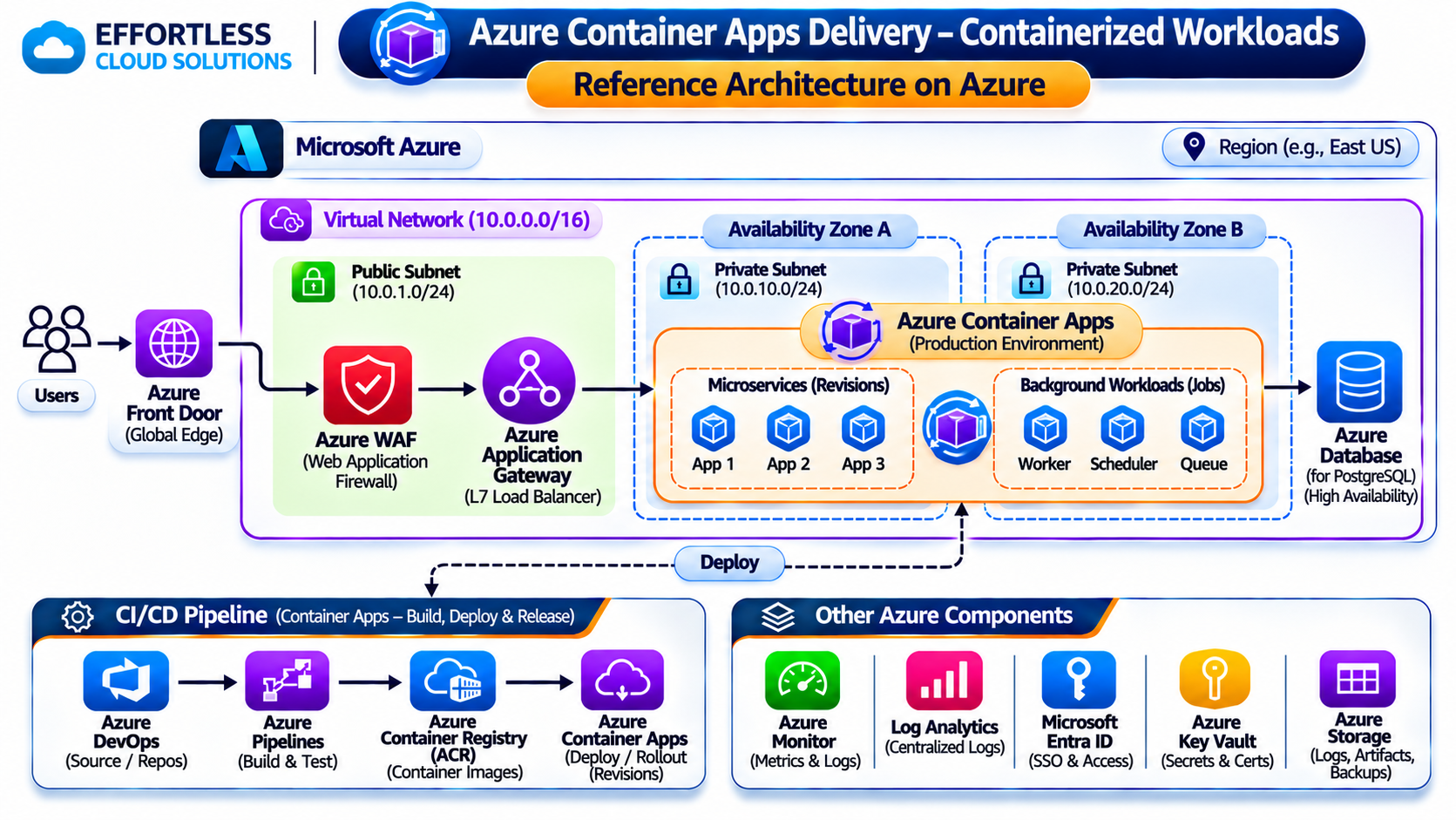
Azure Container Apps removes this operational burden. Users reach the application through a domain in Azure DNS and Azure Application Gateway with Web Application Firewall in a public subnet. Requests are forwarded privately to an internal Container Apps environment in a private subnet, where the API container app scales automatically with KEDA-based rules on the Consumption plan, down to zero when there is no traffic. The app connects to Azure SQL Database over a private endpoint. Azure DevOps pipelines build images from GitHub, push them to Azure Container Registry, and deploy new revisions, while managed identities, Azure Key Vault, Azure Monitor, and Application Insights keep the platform secure and observable.
About Azure Container Apps
Azure Container Apps is a fully managed, serverless container platform built on open-source technologies including Kubernetes, KEDA, Envoy, and Dapr, without exposing the underlying cluster. Apps run inside a Container Apps environment, a secure boundary that shares a virtual network and logging configuration. Environments support a serverless Consumption profile, billed per second for the resources each replica uses, and dedicated workload profiles for apps that need reserved or larger compute. Each app scales between a configured minimum and maximum number of replicas using HTTP, TCP, CPU, memory, or KEDA event-driven scale rules, and each change creates a new revision that can receive all or part of the traffic.
Opportunity: Moving Beyond Over-Provisioned Container Hosting
Running containers on fixed virtual machines means paying for peak capacity around the clock, even when traffic is low overnight or at weekends. Scaling up for busy periods is manual and slow, and operating system patches, container runtimes, and monitoring agents all need ongoing maintenance.
Moving to a full Kubernetes cluster solves scaling but adds complexity that many teams do not need: control plane upgrades, node pool sizing, ingress controllers, and cluster security all become their responsibility. At the same time, applications are often exposed directly to the internet, databases accept public connections, and credentials for registries and databases are kept in pipeline variables or configuration files.
Organizations in this position need a container platform that scales automatically with real demand, charges only for what is used, keeps the application and database private, and makes releases and rollbacks simple, without having to operate Kubernetes.
The Solution
DNS and Edge Protection
The application domain is hosted in Azure DNS and resolves to Azure Application Gateway (WAF v2) in the public subnet. The Web Application Firewall runs in Prevention mode with the Microsoft-managed Default Rule Set to block OWASP Top 10 attacks such as SQL injection and cross-site scripting, along with custom rules for rate limiting. Application Gateway terminates TLS using certificates stored in Azure Key Vault and redirects HTTP to HTTPS.
Internal Container Apps Environment
The Container Apps environment is deployed into its own dedicated subnet with internal-only ingress, so it has no public IP address. Application Gateway forwards traffic to the environment through its private address, resolved by an Azure Private DNS zone for the environment domain. Only requests that have passed the WAF can reach the application.
API Container App on the Consumption Plan
The API runs as a container app on the serverless Consumption profile. CPU and memory are allocated per replica, billing is per second of actual use, and there are no servers, node pools, or clusters to size, patch, or upgrade. Dedicated workload profiles can be added to the same environment for services that need reserved capacity or larger instances.
KEDA-Based Autoscaling and Scale to Zero
Scale rules powered by KEDA add replicas when concurrent HTTP requests, CPU, memory, or queue length cross defined thresholds, and remove them when demand falls. Background and event-driven services scale to zero replicas when idle, while latency-sensitive APIs can keep a minimum of one replica to avoid cold starts. Maximum replica limits keep costs predictable.
Revisions and Safe Rollouts
Each deployment creates a new, immutable revision of the container app. In multiple revision mode, traffic can be split between revisions by percentage to release a new version gradually, and revision labels provide stable test URLs before a version goes live. If a problem appears, traffic is moved back to the previous revision immediately, without rebuilding or redeploying.
Private Azure SQL Database
Application data is stored in Azure SQL Database with public network access disabled. The app connects through a private endpoint in a separate private subnet, resolved through a private DNS zone, so database traffic never leaves the virtual network. The container app authenticates with its managed identity using Microsoft Entra authentication, removing SQL passwords entirely. Transparent data encryption protects data at rest, and automated backups provide point-in-time restore.
Images with Azure Container Registry
Container images are stored in Azure Container Registry with unique version tags. The container app pulls images using its managed identity with the AcrPull role, so no registry credentials are stored in the app or the pipeline.
Secrets with Azure Key Vault and Managed Identities
Any remaining secrets, such as third-party API keys, are stored in Azure Key Vault. Container Apps secrets reference Key Vault directly and are retrieved with the app’s managed identity, then exposed to the container as environment variables or mounted files, so sensitive values never appear in images, source code, or pipeline definitions.
CI/CD with GitHub, Azure DevOps, and ACR
Source code lives in GitHub. On every merge, an Azure DevOps build pipeline runs tests, builds the container image, and pushes it to Azure Container Registry. An Azure DevOps release pipeline then updates the container app to the new image, creating a new revision, with approvals and checks before production. Pipelines authenticate to Azure through service connections that use workload identity federation, avoiding long-lived secrets.
Monitoring with Azure Monitor and Application Insights
Container console and system logs are sent to a Log Analytics workspace and queried with Kusto Query Language (KQL). Azure Monitor metrics show replica counts, requests, CPU, and memory for each app and revision. Application Insights, through OpenTelemetry instrumentation, traces requests from the API to Azure SQL and records failures and response times, and alert rules notify the team when error rates or latency rise.
Results
No Infrastructure to Operate
Containers run on a fully managed platform with no clusters, nodes, or operating systems to patch, so engineering time goes into the application.
Pay Only for What Runs
Per-second billing and scale-to-zero on the Consumption plan remove the cost of idle capacity, while replica limits keep spending predictable.
Automatic Response to Demand
KEDA-based rules add replicas as traffic or queue depth grows and remove them as it drops, keeping response times steady without manual scaling.
Low-Risk Releases
Immutable revisions, gradual traffic splitting, and instant rollback make every deployment reversible.
Private by Design
The Container Apps environment and Azure SQL have no public endpoints, and all user traffic passes through Application Gateway and its Web Application Firewall.
No Passwords to Leak
Managed identities handle image pulls, secret retrieval, and database authentication, removing stored credentials from apps and pipelines.
End-to-End Visibility
Logs, metrics, and distributed traces from the edge to the database are available in Azure Monitor and Application Insights.
AWS Services Used
Core AWS building blocks powering high availability, elastic scaling, security, and automated deployments.
Azure Container Apps
Fully managed serverless container runtime running microservices with built-in revision management, traffic splitting, and zero-cluster overhead.
Container Apps Environment (Consumption)
Secure networking and logging perimeter hosting container applications with per-second billing and automatic scale-down to zero instances when idle.
KEDA Scale Rules
Kubernetes Event-driven Autoscaling (KEDA) integration scaling container replicas dynamically based on real-time HTTP throughput, queue backlog, or system metrics.
Azure Application Gateway (WAF v2)
Layer 7 edge load balancer terminating TLS and enforcing managed OWASP Top 10 rules before routing traffic into the internal Container Apps environment.
Azure DNS + Private DNS
Public custom domain routing paired with internal Azure Private DNS zones resolving secure Container Apps environment and database addresses.
Azure Virtual Network
Multi-subnet isolated virtual network segmenting public edge gateways from private serverless container subnets and database endpoints.
Azure SQL Database
Fully managed relational database secured with Private Link, automated backups, and passwordless Microsoft Entra ID authentication.
Azure Private Link
Keeps application-to-database traffic strictly on the Microsoft cloud backbone, eliminating public IP exposure.
Azure Container Registry (ACR)
Enterprise OCI-compliant registry providing secure, versioned storage for container images with integrated vulnerability scanning.
Azure DevOps Pipelines
Automated CI/CD workflows building Docker containers, running quality tests, and deploying new revisions with automated verification.
GitHub
Central Git repository managing application source code and infrastructure definitions with automated pipeline triggers.
Managed Identities
Microsoft Entra system/user-assigned identities providing secure, passwordless authentication across cloud resources without hardcoded credentials.
Azure Key Vault
Cloud hardware-backed secret management holding application API keys and SSL/TLS certificates mounted directly to container runtimes.
Azure Monitor + Log Analytics
Centralized telemetry collection aggregating container console logs, HTTP traffic trends, and proactive alert rules.
Application Insights
Distributed application performance monitoring capturing end-to-end transaction traces, latency bottlenecks, and error rates.
Send Us a Message
Ready to bring your ideas to life? Tell us about your project and our team will get back to you within one business day.
Denver, CO 80231